DDSPLM PRIVATE LIMITED
The Tecnomatix® suite of digital manufacturing software is utilized for the planning, simulation, validation, and enhancement of product assembly processes and production systems. Tecnomatix stands as a key offering within the Digital Industries Software Digital Manufacturing (DI SW PLM DM) product segment, which encompasses Process Simulate, Plant Simulation, Optimize my plant, and Electronics Process Preparation.
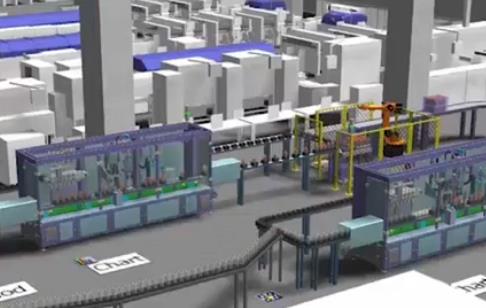
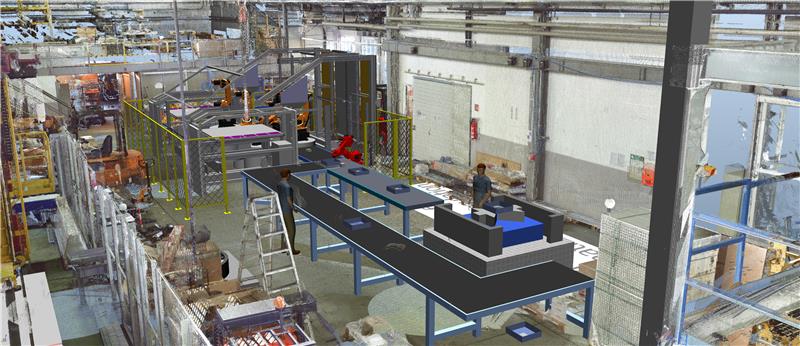
The Process Simulate Collaborate feature within the Tecnomatix portfolio is a 3D cloud-based simulation tool that enables seamless sharing, communication, and collaboration on Process Simulate studies. It boosts productivity and communication by allowing users to dynamically visualize, review, and analyze factory production lines and workcells created in Process Simulate—all without the need for software installation.
Process Simulate is a sophisticated solution supporting the simulation, validation, optimization, and commissioning of complex manufacturing processes in a 3D environment. It is an integral part of the Siemens Xcelerator business platform, which includes software, hardware, and services.
Accelerate simulation and validation of your digital production lines with dynamic, web-based robotic automation visualization. Effortlessly share the results of your Process Simulate studies with stakeholders, and extend simulation outcomes to the cloud to enhance productivity and enable better, faster decision-making.
Utilize cloud-driven Process Simulate Collaborate to enhance robotic automation design results.
Boost your time-to-value without the need for software installation.
Speed up simulation projects with collaborative tools that enable quick and efficient communication.
Distribute studies among various stakeholders and your robotic automation project network with ease.
Cut documentation time for simulation tasks by up to 20%.
Utilize advanced, interactive 3D visualization features.
Conceal and reveal equipment, product, and robot trajectories.
Generate and share collaborative notes and feedback.
Execute standard or pre-recorded simulations.
Show collision lists and confirm collision statuses.
Access on a desktop or tablet through a web browser.
Plant Simulation is a software tool designed for simulating, visualizing, analyzing, and optimizing production systems and logistics processes.
Using Plant Simulation allows for the enhancement of material flow, resource utilization, and logistics across all tiers of your plant planning, ranging from global facilities and local plants to individual production lines.
This software aids in the creation of digital models of logistics systems, enabling you to investigate system characteristics and enhance their performance. The digital model not only allows you to conduct experiments and what-if analyses without disrupting an existing production system, but it can also be utilized in the planning phase well before the actual system is implemented. Comprehensive analysis tools, statistics, and charts assist you in assessing various manufacturing scenarios and making quick, dependable decisions during the initial stages of production planning. Plant Simulation facilitates:
Using Plant Simulation software, you can develop well-organized, hierarchical models of production facilities, lines, and processes. Its robust object-oriented architecture and modeling features facilitate the creation and maintenance of highly intricate systems, including sophisticated control mechanisms.
Models created with Plant Simulation are utilized to enhance throughput, alleviate bottlenecks, and reduce work-in-process. These simulation models account for both internal and external supply chains, production resources, and business processes, enabling you to evaluate the effects of various production scenarios.
Alongside the highly effective 2D model view provided by Plant Simulation, models can also be constructed and visualized in 3D using built-in libraries or your own computer-aided design (CAD) data. The outcome is striking 3D virtual models that are consistently synchronized with their 2D counterparts, giving you the freedom to select the most suitable visualization method without sacrificing simulation and analysis requirements.
Hierarchical, object-oriented modeling using specialized libraries for discrete and continuous processes.
Analyze throughput, resource utilization, bottlenecks, Sankey diagrams, and Gantt charts.
Tools for calculating and optimizing overall energy consumption.
Online 3D visualization and animation using ISO-standard JT format.
Integrated neural networks and genetic algorithms for automated system optimization.
Enhance the efficiency of current facilities
Minimize the investment required for planning new facilities
Decrease inventory levels and throughput duration
Refine system dimensions, such as buffer capacities
Mitigate investment risks by validating concepts early on
Offering a comprehensive production layout solution for manufacturing engineers, Line Designer is a sophisticated application that facilitates the design and visualization of production line layouts within NX™ software. The Siemens Digital Industries Software platform seamlessly integrates, allowing you to effortlessly link the designed layout with manufacturing planning.
This tight integration with planning and equipment design empowers you to effectively oversee the entire manufacturing process. You can optimize the workflow by detailing each production step, including the management of individual manufacturing resources like a robot or a fixture.
By utilizing the parametric resources tied to the manufacturing plan, you can conduct precise impact analyses and promote efficient change management.
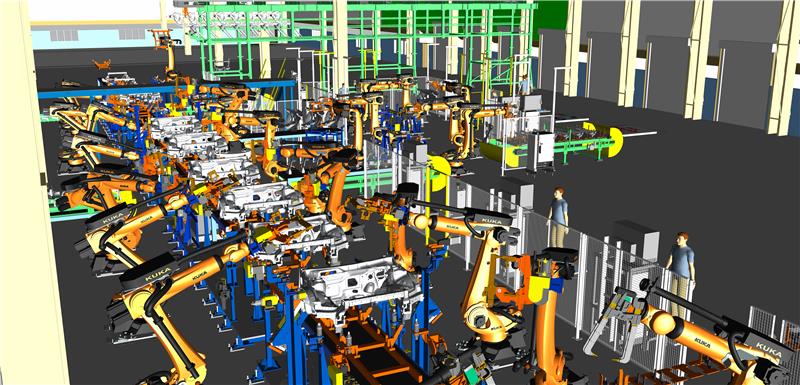
The parametric engine within NX allows for efficient handling of manufacturing components and facilitates easy adjustments. When you change the size of specific components or alter the layout, the related components update automatically.
With Line Designer, you can directly retrieve a layout’s product lifecycle management (PLM) data from Teamcenter. Line Designer provides pertinent details about each component, such as type, design modifications, suppliers, investment costs, and build dates.
Parametric features for developing and modifying manufacturing layouts.
Versatile digital models of manufacturing equipment allow seamless transitions between various 2D and 3D views, all within a single system.
Cutting-edge technology, including visualization tools and JT, enables effective management of extensive and intricate data.
Immediate access to component attributes through NX Visual Reporting.
Verification of designed layouts using Tecnomatix Process Simulate and Plant Simulation software..
Support for multiple CAD systems across manufacturing workflows.
Rapidly create and visualize production lines using NX.
Conduct precise impact assessments and support effective change management.
Use a unified system for designing products, tools, and production systems.
Gain access to a comprehensive equipment library that can be overseen with Teamcenter
Design, validate, and launch manufacturing lines within a single PLM platform.